Medical
Management
Solutions
See
How It Works...
Practice Management Software Demonstration
In an effort to make balancing the day's transactions easier, we offer an optional batch processing feature that allows individuals to be assigned a specific batch of transactions to process and balance.
This is a particularly useful function in clinics with a high volume of transactions.
For example, one individual can be assigned the responsibility of posting all the transactions associated with a rather large Medicare payment. That person would be held accountable for balancing the payment with the corresponding transactions.
This feature makes balancing the end of day easier by breaking the task into more manageable chunks.
With batches, individuals can process transactions from more than one day, even though another individual may have another outstanding unbalanced batch.
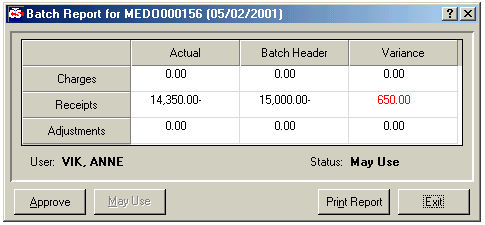
Operators can check the status of a batch at any time by using a jumper (described below at right).
Once the day is balanced, totals from all batches are combined to give the respective clinic totals.
Click below to continue...
Balancing End of Day
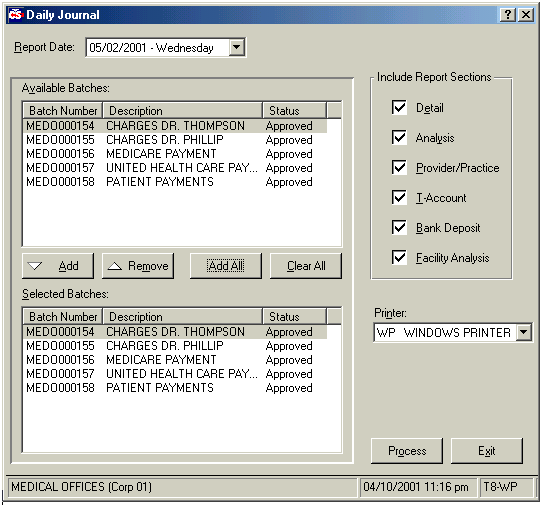
Report options include:
- Detail: Lists entries in patient alpha order itemizing their charges and respective payments
- Provider/Practice: Lists each provider with a breakdown of activity by M.I.S. types and posting code types (shows quantities, amount for each service and number of patients seen).
- T-Account: Displays posting and procedure activity totals in the appropriate debit or credit column. A balanced total appears at the bottom.
- Bank Deposit: A printout of all receipts entered for the day are shown in a deposit slip format. All cash is grouped together; checks are listed by description.
- Facility Analysis: shows breakdowns by facility when more than one facility exists
Throughout the system, operators can access the status of the batch, using a 'jumper', without leaving the window they are currently working in.